If you are looking to customize the way your users login to your BO 4.0 system, a good place to start is the WEB-INF\internal directory in the new BOE webapp structure. It lists the different applications equinox plugin references, and can provide clues into many hidden pathways. If you examine the “BIlaunchpad.properties” file, you will find the reference to the external login methods:
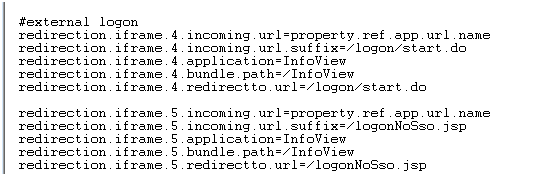
What this spells out, is that essentially, the same paths that worked for 3.x will work for 4.x with minor mods. One technique to create your completely custom logon page, is to collect the user credentials, and the redirect to a procedure that generates en enterprise token, and pass it to the start.do process. The code below is an example of such a process using a simple jsp file. Enjoy your custom login page…
<%@ page language="java" contentType="text/html; charset=ISO-8859-1"
    pageEncoding="ISO-8859-1"%>
    <%@ page import="com.crystaldecisions.sdk.framework.IEnterpriseSession,
com.crystaldecisions.sdk.framework.CrystalEnterprise,
com.crystaldecisions.sdk.exception.SDKException, com.crystaldecisions.sdk.framework.ISessionMgr,
com.crystaldecisions.sdk.occa.security.ILogonTokenMgr, com.crystaldecisions.sdk.occa.security.IUserInfo,
com.businessobjects.bcm.*" %>
<%
try{
    String username = "Administrator";
    String password = "YOUR PASSWORD";
    String cms = "CMS:PORT";
    String authType = "secEnterprise";
    String BOEHost = "BOEHOST:PORT";
    String token = "";
      IEnterpriseSession enterpriseSession = CrystalEnterprise.getSessionMgr().logon(username, password, cms, authType);
      ILogonTokenMgr tokenMgr = enterpriseSession.getLogonTokenMgr();
      token = tokenMgr.getDefaultToken();
      session.setAttribute("token",token);
      response.sendRedirect("http://"+BOEHost+"/BOE/BI/logon/start.do?ivsLogonToken="+token);
      }
      catch(Exception e){
      out.println(new java.util.Date()+": error occured: "+e);
      }
%>
This is Very good information Ron, I have a question, I using custom.jsp to bypass the logon using your code, but the user who have both “Enterprise” and “LDAP” Authentication Types throwing change password page.
But this did not happen when to use tries to logon directly with logon page.
this happens only when try accessing custom.jsp page.
looks like either “CrystalEnterprise.getSessionMgr().logon” or while accessing the “start.do” causing this.
do you have any insight to this?
This is on BO 4.2SP6.
We have been using this method successfully for the past couple of years with BO4.1.
Generating the logon token using the SDK and posting to /BOE/BI/logon/start.do
Additionally we were capturing the user entered userid on our custom login page and setting the cookie InfoViewPLATFORMSVC_COOKIE_USR to the user entered username. We force a new user to change their password on initial login. Using this method the BOE change password page user is set with the value in InfoViewPLATFORMSVC_COOKIE_USR. Our custom app is deployed to the same containter as BOE.
I am in the process of upgrading to BO4.2SP5 and everything works great with the exception of InfoViewPLATFORMSVC_COOKIE_USR which now apparently is encrypted or hashed… have not been able to find where this is being done.
The result… the plain text human readable username that we have been setting InfoViewPLATFORMSVC_COOKIE_USR to is decrypted and presented on the BOE change password screen as unprintable characters. The username field is protected on the change password screen.
I have done quite a bit of searching on the SAP site and on the internet and have yet to find an answer.
Does anyone have a solution to this?
I did the same, previously the code was working fine, but now we have reinstalled the BO and after that I am getting this error.
Is there any setting need to be done on BO side for this functionality to work?
Please help for this…
The error is as:
org.apache.jasper.JasperException: An exception occurred processing JSP page /index.jsp at line 44
41:
42: /* Log onto Enterprise and serialize the Enterprise Session. */
43:
44: enterpriseSession = CrystalEnterprise.getSessionMgr().logon(username, password, cms, auth);
45:
46: String logonToken = enterpriseSession.getLogonTokenMgr().createLogonToken(“”,30,100);
47: //String sdKeyEncode = URLEncoder.encode(sdKey, “utf-8”);
Stacktrace:
org.apache.jasper.servlet.JspServletWrapper.handleJspException(JspServletWrapper.java:584)
org.apache.jasper.servlet.JspServletWrapper.service(JspServletWrapper.java:466)
org.apache.jasper.servlet.JspServlet.serviceJspFile(JspServlet.java:385)
org.apache.jasper.servlet.JspServlet.service(JspServlet.java:329)
javax.servlet.http.HttpServlet.service(HttpServlet.java:742)
org.apache.tomcat.websocket.server.WsFilter.doFilter(WsFilter.java:52)
Root Cause
javax.servlet.ServletException: com.crystaldecisions.sdk.exception.SDKServerException: Internal error.
cause:com.crystaldecisions.enterprise.ocaframework.idl.OCA.oca_abuse: IDL:img.seagatesoftware.com/OCA/oca_abuse:3.2
detail:Internal error.
The server supplied the following details: OCA_Abuse exception 22273 at [channelmgr.cpp : 153] 42254 {}
…setPeerPublicKeyFromBlob failed (keyagree.cpp,76)
Hi Ron,
I have gone through your post and i have created custom.jsp file. we are using BO 4.1 and i have replace standard custom file with custom file. we replace file at two place (i) under webinfo and opendoc folder but still its ask for logon id and password. can you please suggest how to resolve this ?
Thanks in advance.
Regards,
Meghal Shah
What error messages are you getting from the custom .jsp..? That should give you some info, you should look in your tomcat logs..
Hi,
I have implemented your code,but when i am launching the url,it is always logging in using the test id i provided in the code,but it is not taking id from the session.,also i dint mentioned below properties in BILuanchpad.properties are they required?, becuase i dont see by default.
<%
try{
String username = "Administrator";
String password = "xxxx";
Properties
#external logon
redirection.iframe.4.incoming.url=property.ref.app.url.name
redirection.iframe.4.incoming.url.suffix=/logon/start.do
redirection.iframe.4.application=InfoView
redirection.iframe.4.bundle.path=/Infoview
redirection.iframe.4.redirectto.url=/logon/start.do
redirection.iframe.5.incoming.url=property.ref.app.url.name
redirection.iframe.5.incoming.url.suffix=/logon/start.do
redirection.iframe.5.application=InfoView
redirection.iframe.5.bundle.path=/Infoview
redirection.iframe.5.redirectto.url=/logon/start.do
Please read the post carefully, as you see “One technique to create your completely custom logon page, is to collect the user credentials, and the redirect to a procedure that generates en enterprise token, and pass it to the start.do process”. Sounds like you have a different use case in mind, you can use this example as a starting point or a way to get you in the direction of what you are looking for.
Hi,
We have a specific requirement :
1) We have 1600 Pdf files generated from external system every month.Have to make them available to users based on their mapping to specific file .The user should be able to access the files through dynamically generated URL from BO Webi reort.
2) we taught of uploading PDF docs to BO Tomcat server and access them.But couldn’t find a way how to do it.Can you please throw some light on it.
Regards,
Sekhar
If the file names have a pattern that can be mapped to the bo user or data, i imagine you can create a link to each file that can be mapped by user. Might need to create a mapping table if the mapping is not simple.
Hi Ron,
Why I see 2 sessions in CMC/sessions tab when I use your code ?
The 2 sessions have :
– same “last logon time”
– “client session” = “Logon without Client ID”
– different IDs
Hi Jo, did yo modify the example code to use your username, or are you logging in as Administrator on both sessions? You will see in the cmc all the sessions logged against the cmc, whether using the same account or not, this may have an impact depending on your licensing model.
Hello Ron,
Thanks for the blog and discussions are quite interesting.
I am using BI 4.1 SP5, and we configured the Trusted Authentication using Trusted Principal for BI Launchpad.
We have a JSP deployed in a separate webapp within SAP BO’s Tomcat instance say “Custom_BI” and had placed besides default BOE webapp.
Directory structure –
Tomcat\webapp\Custom_BI\index.jsp
Tomcat\webapp\BOE\
The JSP is accessed as – http://BO_Server_Name:Port/Custom_BI
In index.jsp, we accept the token and pass it to URL, like –
url = request.getScheme() + “://” + request.getServerName() + “:” + request.getServerPort() + “/BOE/BI/logon/start.do?ivsLogonToken=” + token;
This works fine when we do response.sendRedirect(url);
However, this has a security concern, because URL displays the token as well, and this URL along with token can be used anywhere and it directly logins into BI Launchpad.
Also with “response.encodeRedirectURL(url)”, as well as writing servlet, but didn’t helped.
The requirement is to hide the URL and possibly display as http://BO_Server_Name:Port/Custom_BI
Hence, now we are trying with “RequestDispatcher” and forward method but it gives 404 error.
E.g. ServletContext sc = request.getServletContext().getContext(“/BOE”);
RequestDispatcher view = sc.getRequestDispatcher(“/BI/logon/start.do”);
view.forward(request, response);
May I request some hints on to how to proceed further and hide the token.
Regards,
Abhay
Is this an external facing system (outside the firewall)? If yes, i would focus on leveraging the proxy/reverse proxy config to handle the redirects and hide the internal urls/access, as well as on ssl (https) externally. For internal only, i would try to understand the security concerns requirements to come up with an appropriate solution.
Just a quick THANKS for this. I am using it to provide a link to log on under a specific ID with access to universes/reports that are sun-setting, and have been disabled for all other users. I don’t know doodly about jsp, but was able to get this working without much ado. So, your posted method is much appreciated. – Eric
Glad this helped, thanks Eric! – Ron
Thanks a lot for the reply.
Actually, I have successfully bypassed the logon screen using JSP and the flash variable as you mentioned. I’m using SAP authentication to connect my dashboard to BW and have hard-coded the username and password of my BW in the JSP (SSO has been setup between BO and BW); Everything works perfectly but my question is , can i encrypt the password in the JSP ? Clear text password may not be a good solution in terms of security.
And by the way, trusted authentication won’t work for me I suppose, because I’m not using Enterprise authentication but SAP.
Thanks
Hi Ron,
Thank you for taking the time to share your knowledge.
I need to bypass BI launchpad login page when accessing an xcelsius dashboard and have done so by creating a JSP file which creates a Logon token. But the problem is that I have hard-coded my SAP password in the JSP. Is there a way to avoid hard coding the clear text password or retrieve the password??
I’m using BO 4.1 and have setup SAP authentication between BO and BW.
Thanks
Pari
Pari, if you are connecting a dashboard via one of the BOE methods (query browser, BI Service, QaaWS, LO, etc..), you can “bypass” the login screen by passing the dashboard a valid logon token as a flash variable called “CELogonToken”. To obtain a valid logon token, you need to obtain an authenticated session. You can do that by using web services SDK, Resftul SDK or JAVA/.net SDK. The authentication method you use may require a user name and password, or just a username (using trusted authentication scenarios). I am not sure what exactly is the scenario you are trying to accomplish, so hard to help beyond this general description..
Hi ron,
how to show validation error on custom bi launchpad page?
i created completly new custom logon page for bi launchpad. above code is working fine with correct username and password. thank u very much for such a good post.but i am facing the problem showing the error message when user tried to login with wrong credentials. pls can u help me with this
When user tried log in with wrong credentials it comes back to the same page. when it comes back i want to display error message by saying wrong username r password. in default bi launch pad when we tried log in with wrong credentials it will come back to the same page with error message in red color. pls can u help me with how to do it in above code.
Chetan, in the example code above, the catch block does nothing but record the error in the webapp logs. You can do a response.sendRedirect to a nice error page…
Hi,
Is it possible to pass the Username and Password in the BO URL itself without using a custom login page.
Hi Anand, you have to obtain a token in BO to login a user. There is a URL based API, called openDoc for retrieving documents, but it also requires a token. The restfull web services can be used to obtain a token, but you have to submit the username and pwd in a post, not over a URL.
Very helpful thread. Thank you Ron.
I have requirement that the user does not want to logon to the BI Launchpad.Veiwing reports in their portal with Input controls/ Drill filter functionality.
is it possible ?
PLs help me out.
Hi Rajesh, yes, that is possible and there are several ways. Depending on the specific use case, you can choose from bypassing the login screen and using the BI Launchpad, leverage the openDocument url api to call specific reports, or leverage one of the several SDKs (crystal, webi, etc..) to programmatically embed content in the external application.
Very helpful thread. Thank you Ron!.
I have a requirement to expose SAP BO as webservice.Is it possible?
Using SAP BI 4.1 version. User does not want to logon or go to SAP BI launchpad.
meaning , view the refreshed report in their web portal with the Input Controls/Drill filters functionality.
is it possible to Integrate?
Pls help me out.
A really really fantastic blog Ron. Great work.
This has resolved a long standing issue that we had faced. Just can’t thank you enough.
Kudos to you.
Thanks again,
Sreekul Nair
Thank you 🙂
I have tried to edit custom.jsp to bypass my login page under \tomcat\webapps\BOE\WEB-INF\eclipse\plugins\webpath.InfoView\web.
After edited ,I stopped tomcat and deleted all files in \tomcat\work\Catalina\localhost and start it again.Something was wrong with my BI when I tried to accesss InfoView via browser, error page 404 Missing Page was showing to me. I don’t know what to do next and I’m a newbie in java developer.
Please Help
Kamchada
Kamchada, you should restore the changes you made and ask someone who has more familiarity with J2EE for assistance. Sounds like the webapp did not deploy The 404 error means the page was not found, so it’s possible that after you removed all the “cache” files, ie the compiled jsp’s, suspect the BI Launchpad did not deploy for some reason. You should be able to find some specific errors in your tomcat logs.
Redeploy BOE.war again helps to solve this error.
Thanks so much
Ron,
All we need to do is add 2 HyperLinks to the Logon Page at the bottom to our Support Email and one to our Self-Help site. Is the custom.jsp the easiest way to do that. Sounds like we’d have to re-write the entire Logon Page to accomplish that. It was so much easier in 3.1.
Hi Jon, thanks for your comment. Yes, it was simpler in 3.1… I can help with your ask and explain how to accomplish this, please feel free to reach out at ron.keler@cleartelligence.com
Hi Ron,
We have 1500 Dealers who are being accessed through the dealer portal to log on to the landing page of our application. Inside the application, we have a Business objects URL where in the Internal users can access to Business Objects 4.0 launcpad. External dealers are being authenticated to the Application through extranet domain where in the Internal Users/Business is being accessed to the application through Active Directory.
Internal Users have access to BO URL link and they are manually entering the user name and password to get into BO Launch pad.
To enable a single sign on in BO for both Dealers and Internal Users, we need to find out a solution for this.
Our Approach is said below
Dealer Portal has the same domain name as like Internal/Corporate user’s domain name. From the Extranet domain, we can pass the cookie information (User name and password) to the application landing page. From the landing page, we will again pass the credentials to Business objects to get authenticated.
But the question is, how the BO can handle the cookies to get authentication. Do we need to add any configuration in BO or Web App server?
The environment is IBM -IHS web server BO SP 04 Patch 10.
Please help me out. if you can share me the script that would be great at my yahoo id prem_kavi2006@yahoo.com
Thanks,
Prem
Hi Prem, thank you for sharing. This is a very specific issue that seems to be beyond the scope of this community blog. I would love to learn more and assist, please feel free to reach out to me at ron.keler@cleartelligence.com for professional services advise.
Hi,
Error in the code posted above (line 13)
should read “String authType = “secEnterprise”;”
Thanks
Thank you Ruben, i removed the misplaced :… 🙂
Hi Ron,
I have recently joined as BO admin (BOXIR2)and trying to undertand how the custom JSp login page is setup. The previous documentation is not correct. Could you please share your email id where i could share details or do i post the same here for clarification. Please advise
Thanks in advance
Rajan
Hi Rajan, for professional services help/consulting support please feel free to reach out to me on ron.keler@cleartelligence.com. Thanks – Ron
Hey Ron, thanks for all the good information. My situation is slightly different. My client wants to pass the BOE creds to another web based app. Example: go from dashboard (swf) file to another web app.
Is this possible?
thanks!!!
Hi Deanna, you can certainly pass the user id from BOE to another app, but if you are looking for more then that, some sort of programmatic handshake and authentication, then you will need to come up with some “trust” mechanism between the two apps that you can use to authenticate the user coming from the dashboard into the external app.
Hi Ron, this post is really helpful. I am also trying to create a logoff.jsp page, once user logout of Launchpad it should go to logoff page instead of logon. How do I do it.
Thanks, Hari
Hari, checkout: http://bihappyblog.com/tag/sap-bi-launchpad-custom-logoff/
Thanks Ron, I have created a logoff.jsp page with my team name and contact details. Is there a way to point to that. I tried copying the file to “Program Files\SAP BusinessObjects\Tomcat6\webapps\BOE\WEB-INF\eclipse\plugins\webpath.InfoView\web” location and updated the BILaunchPad.properties file but no luck.
Thanks, Hari
Found a way, added my customized logoff.jsp to “\Program Files\SAP BusinessObjects\Tomcat6\webapps\AdminTools” and updated BILaunchPad.properties file as “url.exit=/AdminTools/logoff.jsp” and it worked.
Hi Ron,
Using Admin credentials and the code snippet below, I am able to succesfully logon and create a token but when I try as a “normal” user, I get a message saying my credentials are invalid. I have verified that I can log into Launchpad using the “normal” users credentials. This makes me think that perhaps it’s a security setting somewhere. Any ideas?
CODE SNIPPET:
IEnterpriseSession enterpriseSession = CrystalEnterprise.getSessionMgr().logon(username, password, cms, authType);
ILogonTokenMgr tokenMgr = enterpriseSession.getLogonTokenMgr();
token = tokenMgr.getDefaultToken();
Hi Mandy, what version of BOE are you using? Can you confirm the jar versions are correct for the server version you are using? This sounds like a permission issue, can you add some debug code and confirm the “normal” user you are using generates a token? What do you do with the token? Do you redirect the request to a different URL? Can you paste the actual error message you receive? Thanks – Ron
I am looking for popup message to be displayed when BI launch pad loads.
Any ideas how to go about or in which file i should embed alert function?
Thanks
Hi Ali, BI 4 has alerts built in, so you can leverage that perhaps.
Hi Ron,
Not sure is it the right place to post this issue or not but I have a requirement where Header has to repeat on every page in all the webi documents instead of manually setting this option each time when ever user creates the report.
Please help me how to do this ?
Even if I use your above mentioned code, I still receive the same error.
Can you please help?
I might have mistaken in mentioning my code in above post,
Hi Ron,
Thank you very much for your informative comments. I am trying to use a custome JSP code. Please confirm if I do need to put my jsp file in a folder in Tomcat6/webapps folder as we usually do? or shall I need to put it somewhere else? Since I am getting error on runing a below mentioned code..
ERROR: java.lang exception
I would really appreciate your insights on this.
With regards,
Chaitanya
Hi Chaitanya, do you have all the jars setup in the WEB-INF directory of your custom webapp you deployed onto Tomcat \webapps directory? Thanks – Ron
Hi Ron,
Thank you very much for your instant reply. I got delayed in posting my comment. I actually managed to run the code in BO 4.0. I can see my Dashboard is being opened properly with some space left at both the sides. Tried removing that space but not completely could achieve it.
Concern is, the application menu in the header part doesn’t work after applying this SDK code.
I am not sure if my code is affecting this. Any insights would really help me out.
Hi Chaitanya, i guess i would need to learn more about what you are doing to assist. By passing a logon token to the BOE Desktoplaunch webapp as described in the post, will simply allow you to bypass the BOE login page. The rest of the app will function normally. It sounds like you may have some specific things you are doing related to dashboards? Dashboards actually require the BOE token to be delivered in slightly different format, via flash variable, and with a slightly different name, you can find other examples in my blog (and over the net) for embedding Xcelsius dashboards. Thanks. – Ron
Hi Ross,
Thank you for your response.
Can you please dig it more? I am using sendRedirect method with opendocument url passing into it.
Below is a code I am using.
Hi Ron,
It worked out. Issue was about the menu which written in Java Script was creating a problem and replacing that menu script file with DHTML worked out with solution perfectly.
One more thing. When I open Webi report panel, it opens with DOCUMENT SUMMARY tab appears by default at left side. Is there anyway I can hide it & open the report in READ ONLY VIEW.?
Sorry if this issue is not related to this blog.
Thanks in advance.
Chaitanya
Hi Ron,
How are you doing …
I have implemented the above mentioned code and able to login successfully.But when I click on Logoff it is executing Logon.jsp by redirecting to below URL .
http://BOEHOST:PORT/BOE/portal/1301161704/InfoView/logon.jsp
Could you please help me how where to find this logon.jsp page in BO and so that I can customize that page aswell.
Hi Sia, look at the properties files as indicated in the post, there should be an attribute that allows you to specify a custom logout page… Thanks – Ron
Still I am waiting for your reply. We have a problem in Webi reports. It is showing “SSO token or user password is empty”. please help me ….
HI SAravanan, sounds like there is some issue with your code. Without engaging and looking at the details, i really can’t help much. Feel free to reach out to me over email, or contract my company Cleartelligence, for professional services help. Thanks – Ron
Anybody share the coding which is help to me. I am looking to pass the user name and password thru external application.
saravanan, thank you, i did post the code in this blog post, not sure what else you are looking for..
Is there different code for .net application.This code giving error in .net application.I want to bypass the logon page by generating logon token in .net application using dll files.Please share.
Thank you
Thank you MR. Ron
I have implemented your code and it is working fine .But ,Someone created a report in webi 4.0. It was working well but now when I incorporate your program refreshing these report it gives me “[Internal] SSO token or User password is empty. Please help me .
Hi Ron,
Thanks a ton for your response ,
I have created a sample jsp with the above mentioned sample code and getting the below error.
Your help is highly appreciated .Thanks a lot again
Exception in thread “Thread-8” java.lang.ExceptionInInitializerError
at com.businessobjects.bcm.BCM.(BCM.java:1144)
at com.crystaldecisions.enterprise.ocaframework.BCMInitializer.run(BCMInitializer.java:29)
at java.lang.Thread.run(Thread.java:619)
Caused by: java.lang.SecurityException: Toolkit not encapsulated by a jar.
at com.rsa.cryptoj.f.ug.d(Unknown Source)
at com.rsa.cryptoj.f.ug.b(Unknown Source)
at com.rsa.cryptoj.f.nd.b(Unknown Source)
at com.rsa.cryptoj.f.nd.c(Unknown Source)
at com.rsa.jsafe.CryptoJ.isFIPS140Compliant(Unknown Source)
at com.businessobjects.bcm.internal.BcmRsaLib.initialize(BcmRsaLib.java:214)
at com.businessobjects.bcm.internal.BcmRsaLib.(BcmRsaLib.java:289)
Sai, looks like a problem with your class path. Make sure you use all the right jar versions, please refer to the SDK documentation for the application setup. Here’s a list of jars you’ll need for authentication and web services access:
aspectjrt.jar
axis.jar
bcm.jar
ceaspect.jar
cecore.jar
celib.jar
cesession.jar
commons-discovery-0.2.jar
commons-logging.jar
corbaidl.jar
cryptojFIPS.jar
ebus405.jar
jaxrpc.jar
logging.jar
saaj.jar
TraceLog.jar
wsdl4j.jar
Hi Ron,
We have a requirement from our client to Customize BI Launch Pad page and for this I have seen above article and understood that
1. Create a Custom java WebApp in other machine by copying the necessary .jar files from BI 4 Installation Directory .
2. Create a sample logon jsp file which will create a BO session and then pass this session token to the ” http://“+BOEHost+”/BOE/BI/logon/start.do?ivsLogonToken=”+token ”
Please correct me if I am wrong above.
Need few clarifications before I start implementing above things .
I have opened BI Launch Pad URL in a IE webbrowser and logged into it , now I have opened the http://“+BOEHost+”/BOE/BI/logon/start.do in an other tab of same IE window and able to get into it since IE have the BO session stored. Now if I see in this tab the home screen of BI Launc Pad gives warning says ” Home Page Modules run only when working in BI Launch Pad ”
So if I do the customization by creating webapp and paasing the logon token to the “http://”+BOEHost+”/BOE/BI/logon/start.do?ivsLogonToken=”+token ” then we will get the same error ” Home Page Modules run only when working in BI Launch Pad ” . Please help me how to avoid this .
Sai, the path you described will not work because you are logging in through the BI logon page, and then trying to “hijack” the session. This was possible in 3.x pretty easily, but with the new equinox architecture redo in 4.x is a bit more complex. An easier approach is what i described in the post. As long as you obtain a valid session token and pass it to the start.do process in the manner described above, you will have no issues.
Hi Ron,
Thank you for all the great info. I work as a BOE consultant but are by no means a java developer. As you said above logging into infoview via a logon token was alot easier before BOE 4.0. I have a requirement with a client to run a Xcelsius Dashboards on a plasma. All the dashboards are hosted in BI Launchpad. Their plasma software will need to access the particular dashboard inside BI Launchpad.
Would I need to follow your advise above, building a seperate Java app to achieve this or is there another method to achieve this requirement.
Thank you Paul. To embed an Xcelsius swf that uses BO connections (QaaWS, LO, BI Services) you need to pass a “special” flash variable to the swf object on initialization called CELogonToken. The CELogonToken must be a valid BusinessObjects session token. Once the Xcelsius generated swf sees that, it uses this session token when it fires the data connections, and all is well. There are many programmatic ways to generate a BO token via different SDKs, in my example i used the java enterprise sdk, but there are web services you can leverage, .net sdk and more. It kind of depends on your integration use case. Thanks – Ron
Hi All,
i think this is not the right place for for it but my question is:
Company requirment is to replace the Inbox with Document tab in BI launchpad home page. is there any way to do this changes
thanks in Adwance
Hi San, in the CMC, you can select a group and set its BI Launchpad Preferences, so you can set for the Everyone group for example the folders to be the default home tab. It’s that easy with BI 4, SP4. In older version you can change user preferences in bulk as well, but may need to do that programmatically.
Hello Ron,
Thankyou for your reply.I come from the SAP world and java and webservices are still a little new to me.
Our homegrown portal resides on Websphere and for sure have no BOE SDK on it . Today there exists a hardcoded link on our portal that links to the default URL of Bobj.Users are then forced to enter a logon id and password to log on to Bobj . Windows authentication and LDAP authentication do not work for various reasons. So I am looking at options on how to embedded the id and password into the BOBJ URL (based on their portal id and password).Any detailed steps towards achieving this or even pointing me to the right documentation would be helpful.
Thanks for all your valuable knowledge.
Regards
Rajani
Rajani, there is no way to login to BO by passing a username and password over URL. That is simply not secure enough. You need to capture the user credentials and use the SDK to generate a token that you can pass to BO as an authenticated session. You can use my code example, but you will need to setup the web application properly for this to work.
Hello Ron,
Your article and your code are very very interesting and thankyou very much for posting them. I am attempting to do something like what you have described in your article but I am not sure if I understand it fully.
We want users to log on to Bobj directly from our home grown portal. SO are you saying I can create a simple jsp file on my portal server and have the id and password pushed to the BOBJ url .
Please note we have only Bobj 4.0 and i do not have SDK, if that makes sense .
All help on this matter is highly appreciated.
Rajani
Thank you Rajani, you can generate the businessobjects token on any web server, as long as it contains the necesary jars to connect to the BO server, pass user credentials and generate a token. So, while the jsp code itself in this example is simple, it relies on all the necessary BO SDK jars to be available to the generated Servlet in the java app path. If you are not very familiar with java, note the import declarations at the top of the file, these require the jsp file has access to the BOE SDK. You can also generate a token using web services on other platforms, say .net or even php (i wrote about this in other posts). Hope this helps. Thanks – Ron
Ron,
SAP’s recommended approach for this is to utilize the custom.jsp and nocachecustomresources.js files. Along with these files, we utilize the Web Session variables and TrustedAuthentication to do our heavy lifting in getting seamless sign on. In 3.1 we did it similar to your approach and it was awkward. The new features of BI 4.0 clean this up considerably. Note: You need to make sure that you update files in the appropriate places as well, a redeploy will blow away your files if you didn’t update BOE.war.
Regards,
-Mark
Mark, thank you for your comment, this is good info. In the example above, i did not customize any BI 4.0 files, rather created a separate SDK application (on a different server in my case), to generate a token based on a custom login form, and then pass the token to the BO app. Thanks – Ron
Ron, Thank you for the answer. That explained and helped a lot. I was getting frustrated trying to put it in different directories and still getting missing page error. I will work with the developers from other team to incorporate the BO sdk jars in their app, generate the token and then sent it to Busines objects for login. Thanks again for this very helpful post. I am sure it would have helped ahd will help several others trying to do the same thing. Thanks, Shera.
Glad to hear this was helpful and good luck with your project.
Can you share the coding which is help to me. I am looking to pass the user name and password thru external application.
Hi Ron,
could you pelase tell me under which directory inside \BOE do i need to save this jsp page if i want to send userid/pwd from external application.
Thanks, Shera
Shera, thanks for your interest in this post. In 4.0 BO moved to a new architecture, based on eclipse plugin architecture. This change has a lot of security, scalability and stability improvements in it, but also means that customizing the webapps is not as simple as it used to be. To extend an existing webapp, you now need to essentially extend the plugin, tightly integrating into the existing webapp. You can no longer just drop a .jsp file in a directory and have that generate a new servlet that integrates into the boe webapp. For this approach, i created a separate custom app (on a different webapp for that matter), and used the redirect with the token to bypass the login and get users inside boe from a custom logon form. You can refer to the enterprise sdk docs for 4.0 for information and example code for creating custom applications. Thanks – Ron
Hi Ron,
Thanks for the good post,We are looking to build a new Logon Page for BI Launchpad and the users will login with LDAP authentictaion. can you please help me with a step by step process how to do that. I would really appreciate your help.
Phani, there are several approaches you can take to accomplish that, the one outlined in this post is one of them. In the example below i illustrated using the secEnterprise plugin, you can of course use the secLdap plugin just as easily. Feel free to reach out to me over email with more specific details about your company, your project, and what you are looking to accomplish, and we can look to engage further. Thanks – Ron